How to Build Agentic AI from Scratch
How to Build Agentic AI From Scratch
Not by installing a framework on day one. By writing the loop yourself in forty lines, discovering what breaks, and adopting each tool at the exact moment it solves a problem you have actually hit.
Framework first is how people end up debugging abstractions instead of agents
The standard tutorial opens with an install command and a fifteen-line snippet that produces something impressive. It works. Then you need to change the retry behaviour, or see the raw messages, or understand why the agent called a tool twice — and you are three layers deep in someone else's control flow, reading source to find where your prompt actually went.
The problem is not that these frameworks are bad. Several of them are excellent, and this article recommends most of them. The problem is adopting an abstraction before you have felt the thing it abstracts. You cannot evaluate a solution to a problem you have not had.
So build the loop by hand first. It takes an afternoon, it is genuinely small, and afterwards every framework decision becomes obvious — because you will know precisely which line of your own code you are replacing and why.
An agent is a while loop with tool access
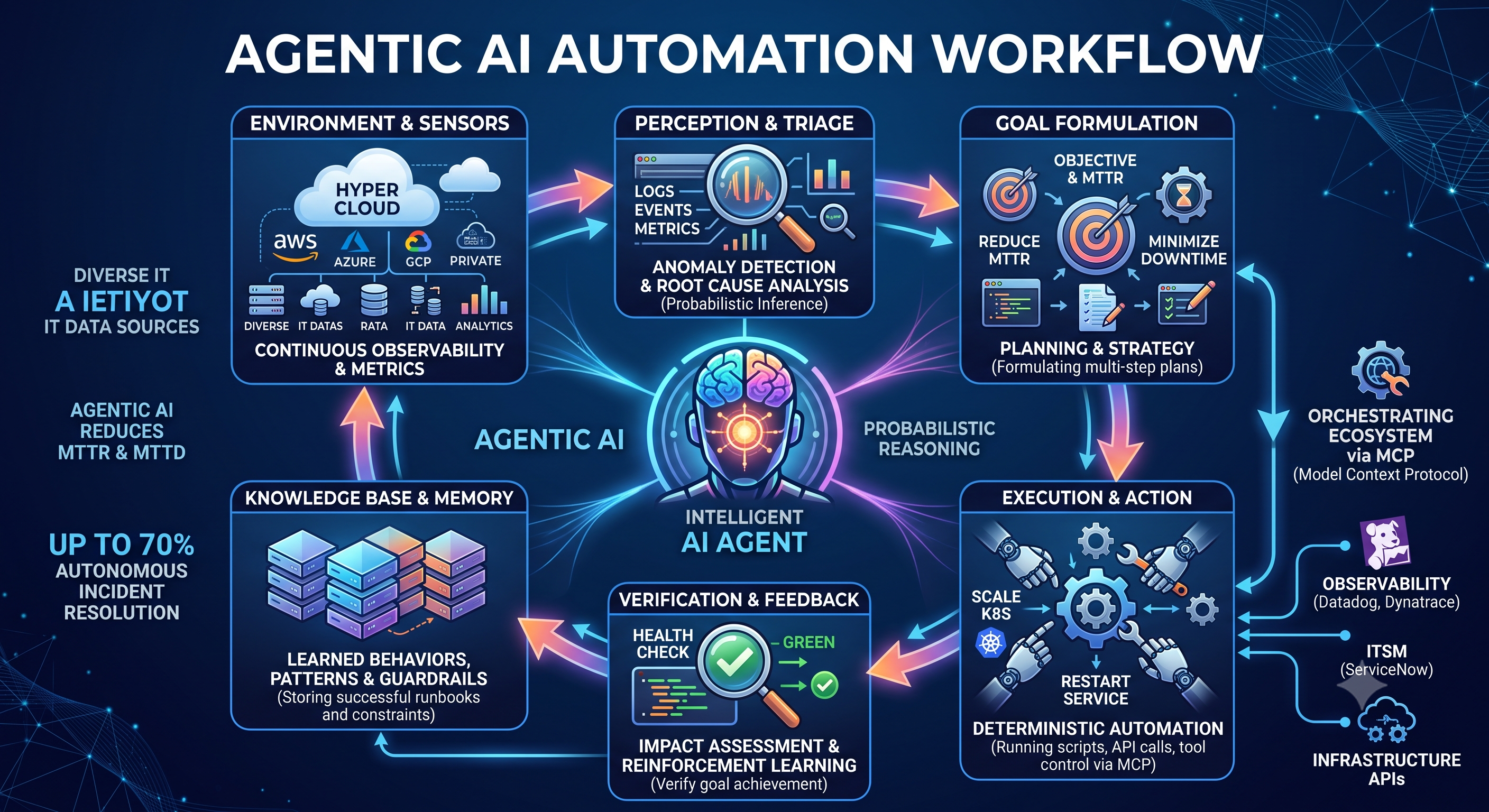
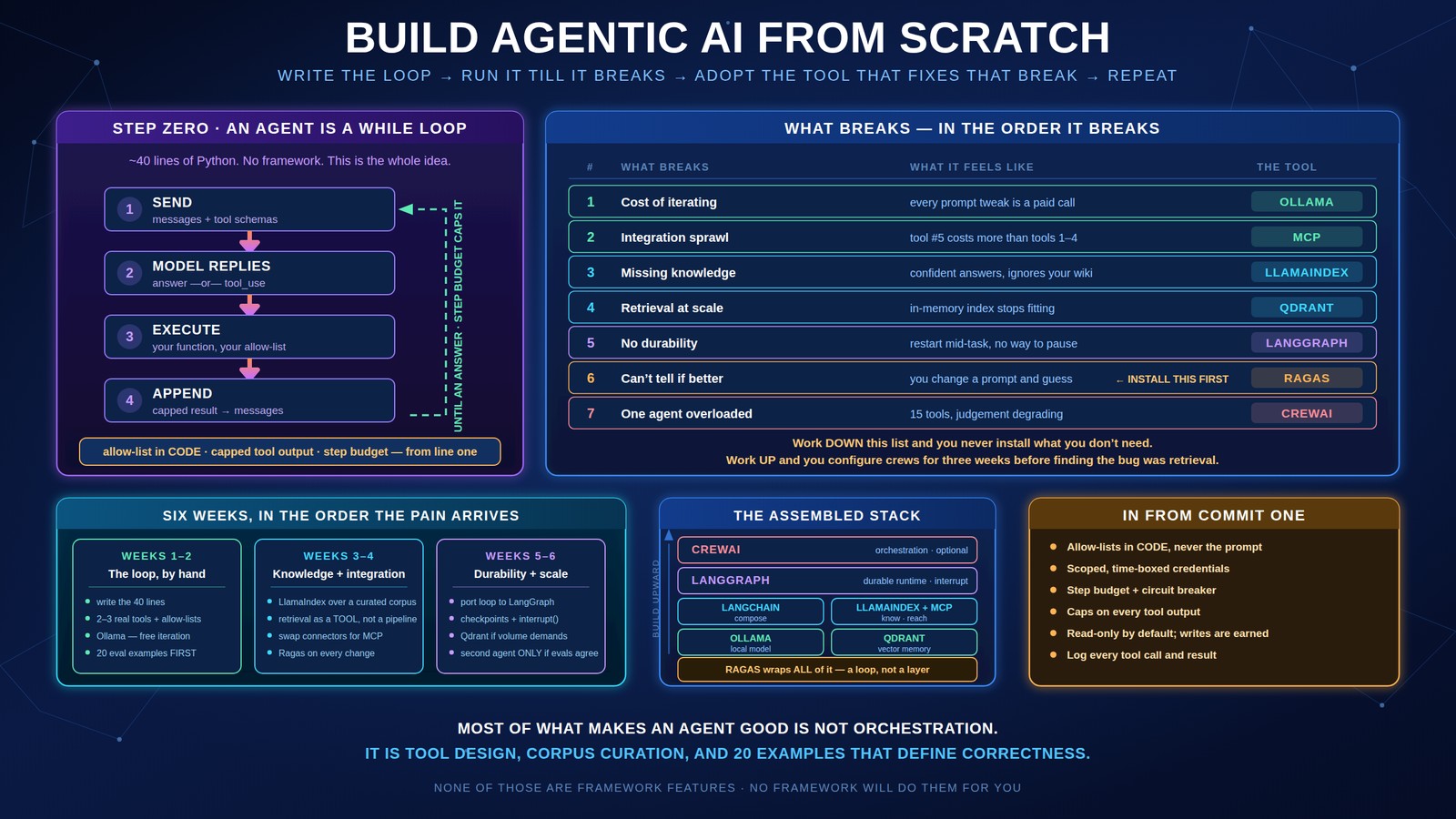
Strip away the vocabulary and an agent is this: send a message, get back either an answer or a request to call a function, execute the function, append the result, repeat until there is an answer. That is the whole idea. Everything else in this article is infrastructure around that loop.
Run that. It will investigate a real cluster, chain three or four calls, and come back with a diagnosis. There is no framework, no orchestration layer, and no configuration file. If you understand every line above, you understand agents.
Notice three things that are already right, and that most tutorials get wrong. The allow-list is code, not a sentence in the prompt — the model cannot talk past it. The tool output is truncated, because an unbounded kubectl logs will eat your context window and your budget. And there is a step budget, because the failure mode of an agent that cannot solve something is not stopping — it is trying forever.
What breaks, in the order it breaks
Take that forty-line agent and use it seriously for a week. You will hit the following, roughly in this sequence. Each row is a tool's entire reason for existing.
| What breaks | What it feels like | What fixes it |
|---|---|---|
| Cost of iterating | Every prompt tweak is a paid API call, and you tweak a hundred times a day | Ollama — run a local model while you iterate |
| Integration sprawl | The fifth tool takes as long to wire up as the first four combined | MCP servers instead of bespoke connectors |
| Missing knowledge | Confident answers that ignore your architecture and your runbooks | Retrieval — LlamaIndex |
| Retrieval at scale | The in-memory index stops fitting, or takes seconds to search | Qdrant |
| No durability | The process restarts mid-task and everything is lost; no way to pause for a human | LangGraph |
| No idea if changes help* | You improve the prompt and genuinely cannot tell whether it is better | Ragas — install it 1st* |
| One agent doing too much | Fifteen tools, a 6,000-token system prompt, degrading judgement | Split into roles — CrewAI, or just a second loop |
Work down this list in order and you will never install something you do not need. Work up from the bottom — starting with multi-agent orchestration — and you will spend three weeks configuring crews before discovering your retrieval was the problem all along.
The stack you end up with, in three sentences
Everything on that list sorts into three families. Worth holding the shape in your head before the detail, because it makes the sequencing obvious — you need a model to iterate against, then structure around it, then everything else is a capability you bolt on when the need appears.
Local LLMs
Run models on your own machine with Ollama — no API keys, no per-token billing, no data leaving your hardware. This is where iteration happens.
Framework stack
LangChain for composition, LangGraph for stateful and durable agents, LlamaIndex for retrieval — modular pieces you adopt one at a time, not a bundle.
Tool ecosystem
MCP servers for integration, CrewAI for teams, Qdrant for memory at scale, Ragas for evaluation. Eight layers in total, all open-source.
Ollama — stop paying to iterate
The build phase is not where model quality matters most; it is where iteration speed matters most. You will change the prompt, the tool schema, and the truncation limit dozens of times before the shape is right, and paying frontier prices for each of those cycles is both slow and quietly expensive.
Point your client at the local endpoint and iterate for free, offline, with no rate limits. Once the loop's shape is stable — tools correct, truncation sensible, step budget tuned — switch the model to a frontier one and evaluate properly. Keep the local path working, though: it stays useful as your regression harness and as the classifier tier if you later route by difficulty.
A caveat worth internalising early: a small local model will fail at tool selection in ways a frontier model will not. That is informative rather than annoying. If your tool descriptions are ambiguous enough to confuse an 8B model, they are costing you accuracy on the big one too. Treat the local model as a test harness for your tool design.
MCP — the moment integrations stop scaling
The first tool takes an hour. The fifth takes a day, because it has its own auth flow, its own pagination, its own error semantics and its own rate limits. This is where agent projects quietly turn into integration projects.
The Model Context Protocol standardises the interface: one protocol, a server per system, and any agent can consume any server. Practically, it means you stop writing connectors and start configuring them — and there is a large catalogue of existing servers for the systems you probably need.
Two design habits matter more than which servers you pick, and both were visible in the forty-line agent:
- ◆Scope per agent, not per system. Each agent gets credentials for only the servers its job requires. The tool surface becomes a security boundary rather than a convenience.
- ◆Return summaries, not dumps. A search tool that returns 4,000 log lines will consume your context and your budget. Return counts, top signatures, and a pointer to fetch detail on request.
The catalogue is large enough that most of what you need already exists — filesystem, Postgres and SQLite, web search, GitHub for repos and issues, browser automation, Slack and Discord. Your agent discovers what is available, reads the tool descriptions, and decides what to call.
LlamaIndex — when the agent needs to know your things
Your agent will confidently recommend a practice your platform team banned two years ago, because it has read the internet and not your wiki. That is the retrieval gap, and it is the point where RAG earns its place — not before.
LlamaIndex is the most direct path from a folder of documents to a queryable index, and it handles the parts that are tedious to do well: format-aware parsing, chunking strategies, metadata filters, and hybrid retrieval.
Note what this is: retrieval as one more tool the agent may call, not a pipeline the agent is trapped inside. The agent decides when it needs your standards, exactly as it decides when it needs kubectl. That composition is far more flexible than a fixed retrieve-then-generate chain, and it falls out naturally from having built the loop yourself.
The unglamorous part matters most: curate the corpus. Your wiki holds the current standard, three superseded versions, and a proposal nobody adopted. Index all four and the agent will cite whichever is nearest in vector space, with total confidence. Ten current, owned, dated documents beat a thousand unmaintained ones.
Qdrant — when the in-memory index stops being adequate
The default index rebuilds on startup and lives in RAM. That is genuinely fine for a few thousand chunks and a single process, and you should stay there as long as it holds. You graduate when rebuilds get slow, when you need filtered search across tenants or dates, or when more than one process needs the same index.
Qdrant is written in Rust, runs as a single container, and its filtered search is the feature that actually matters day to day — restricting retrieval to a team, an environment, or a date range before ranking semantically. Metadata filtering is consistently one of the highest-return improvements available in production retrieval, and it is cheap.
That filter is doing the work the embedding model cannot: it removes superseded documents and other environments before semantic ranking happens. Quantisation and horizontal sharding are there when you need them, but filtering is what you will use every day.
Migrating is a vector-store swap in your LlamaIndex configuration rather than a rewrite — which is precisely why building retrieval as a tool, behind a function you control, pays off.
LangGraph — durability, and the ability to pause for a human
This is the first break where hand-rolling stops being reasonable. Your loop holds state in a Python list. Restart the process and the investigation is gone. Worse, there is no way to pause — to stop before a consequential action, wait for a human, and resume with the decision, possibly hours later.
LangGraph reached 1.0 in late 2025 and is stable, with a commitment to no breaking changes before 2.0. It gives you three things that are genuinely hard to build yourself: durable state that survives restarts, checkpointing you can rewind to, and first-class interrupt-and-resume for human approval.
When the prebuilt agent is not enough — you want explicit branching, a reflection step, or a plan-execute-critique cycle — you drop to the graph itself:
Nodes are LLM calls or tool executions; edges are conditional transitions. Cycles are the point — this is what lets an agent revise its plan mid-execution rather than committing to the first approach it produced.
The interrupt call is the piece worth understanding. The graph stops, the entire state is persisted, and the process can die. A reviewer approves next morning, the graph resumes from exactly that point with the decision injected. Building that yourself means writing a durable state machine — which is a real project, not an afternoon.
An honest note on the ecosystem: LangChain 1.0 is a large framework and the abstraction cost is real. My recommendation is to reach for LangGraph for the runtime — durability, checkpointing, human-in-the-loop — while keeping your own tool functions and prompts. Use as much or as little of the LangChain layer above it as earns its place.
github.com/langchain-ai/langgraph · github.com/langchain-ai/langchain
Ragas — the one you should have installed first
Sixth in the sequence of things that break, and the one I would move earliest if I were doing this again. At some point you change a prompt, the output looks different, and you have no way to say whether it is better. From then on every change is a guess, and guesses accumulate into a system nobody trusts.
Ragas is the standard framework for evaluating retrieval and generation pipelines, with metrics for faithfulness, context precision and recall, answer relevancy, and tool-call accuracy — plus test-set generation when you have no labelled data. Note the repository moved: Exploding Gradients now operates as Vibrant Labs, so the canonical home is github.com/vibrantlabsai/ragas. Old links still redirect, but pin the new path.
The practical advice is smaller than the tooling suggests. Write twenty examples by hand before you write the pipeline. Twenty real questions with the answers you would accept. That file is worth more than any metric — it forces you to define correctness, it catches regressions immediately, and it turns "the new prompt feels better" into a number you can defend in a review.
CrewAI — multi-agent last, and only when one agent is genuinely overloaded
Multi-agent architectures are the most exciting part of this space and the most commonly premature. The legitimate trigger is specific: your single agent has accumulated fifteen tools and a sprawling system prompt, and its judgement is visibly degrading because every decision is made with all of that context loaded.
Splitting into roles fixes that by giving each agent a narrow tool surface and a small, focused prompt. CrewAI models this directly — agents with roles, goals and backstories, coordinated through tasks — and it is the fastest way to express a team of specialists.
Two cautions from the previous articles in this series, both of which bite hard here. First, probabilistic checks do not compose: if each hop catches 70% of bad outputs, five hops end-to-end catch about 17%. Put deterministic enforcement at the point where actions become effects, not distributed across the chain. Second, debugging multiplies. A wrong answer from one agent is traceable; a wrong answer emerging from four agents negotiating is a genuinely hard afternoon.
Start with two agents. If two clearly beats one on your evaluation set, consider three. And note that "multi-agent" often just means running your own loop twice with different tool lists — you do not always need a framework to get the benefit.
The guardrails that belong in from the first commit
These cost almost nothing to add early and are painful to retrofit. They were all present in the forty-line agent, which is the point.
- ◆Allow-lists in code, never in the prompt. A rule the model can read is a rule the model can rationalise past. Enforcement lives where the context window cannot reach.
- ◆Scoped, time-boxed credentials. Over-scoped tokens are the single most common root cause in documented agent incidents. The agent should reach exactly as far as its task requires.
- ◆A step budget and a circuit breaker. Agents that cannot solve something do not stop; they retry. Cap it, and detect thrash.
- ◆Caps on tool output. Unbounded returns are the largest single line item in your token bill and they degrade reasoning.
- ◆Read-only by default; writes are a deliberate promotion. Start with an agent that can only observe and recommend. Grant mutation per action, on evidence.
- ◆Log every tool call and result. Free while you build, impossible to reconstruct afterwards, and the only way to answer "why did it do that".
How the layers sit together
Assembled, the stack has a clear shape. Orchestration sits on top, the runtime holds state beneath it, composition and retrieval sit alongside each other in the middle, and the model plus its memory form the foundation. Nothing here is mandatory — most useful agents use four of these six.
The complete stack, and how to bootstrap it
| Layer | Tool | Adopt it when |
|---|---|---|
| LLM runtime | ollama/ollama | Immediately — iteration should be free |
| App framework | langchain-ai/langchain | Provider abstraction or middleware earns its cost |
| State machine | langchain-ai/langgraph | You need durability, checkpoints, or human-in-the-loop |
| RAG / documents | run-llama/llama_index | The agent needs to know your things, not the internet's |
| Vector database | qdrant/qdrant | In-memory stops fitting, or you need filtered search |
| Multi-agent | crewAIInc/crewAI | One agent is genuinely overloaded — and evals agree |
| Tool integration | punkpeye/awesome-mcp-servers | The fifth integration costs more than the first four |
| Evaluation* | vibrantlabsai/ragas | Earlier than you think — ideally week 1* |
| Templates | Shubhamsaboo/awesome-llm-apps | You have hit a break and want to see it solved |
| Curriculum | microsoft/ai-agents-for-beginners | You want the guided path alongside the build |
Bootstrap in four commands
The commented-out lines are deliberate. A single pip install of the whole stack on day one is how you end up with six abstractions you have not yet needed, and no idea which one is causing the behaviour you are debugging.
Six weeks, in the order the pain arrives
Two resources that are worth the time
Microsoft's AI Agents for Beginners — a free twelve-lesson curriculum covering the full stack, no paywall and no signup. Structured, current, and genuinely comprehensive. If you want a guided path rather than a build-and-break approach, start here and use this article as the opinionated commentary alongside it.
Awesome LLM Apps — 100+ end-to-end templates covering RAG, agents, multi-agent teams, voice agents and MCP, with working code rather than snippets. The right way to use it is diagnostic: when you hit one of the seven breaks above, find the template that solved it and read how, rather than browsing for inspiration first.
One caution about both: read them after you have written your own loop. Reference implementations are enormously more useful when you can see which of your problems they are solving, and enormously more confusing when you cannot.
The loop is small. Everything else is consequence.
The reason to start from scratch is not purity, and it is certainly not that frameworks are bad — this article recommends five of them. It is that the forty-line version teaches you the shape of the problem, and every subsequent decision becomes a judgement about your own code rather than an act of faith in someone else's.
You will also discover that most of what makes an agent good has nothing to do with orchestration. It is tool design — clear descriptions, narrow surfaces, shaped outputs. It is corpus curation. It is having twenty examples that define correctness. None of those are framework features, and no framework will do them for you.
Write the loop. Break it. Fix what actually broke. In six weeks you will have a system you can reason about at three in the morning — which, when it starts touching production, is the only property that matters.